Risks and Control Environment Assesment
Auditdesktop provides the relevant information for each level of your business.
See the whole picture in three easy steps
Step 1 - assess the risks
During the planning process the auditor studies the entity in order to assess the business risks and their impact on the assertions for every significant accounting entry. At any given moment, you are able to identify the risks, which may result in issuance of financial statements that do not give a true and fair view of the financial performance of the company in all material respects.
AuditDesktop allows you to identify and assess the impact, probability and the significance of all risks – and the relevant assertions and items from the financial statements that are affected.
A cross-reference link between the documents where the risks are identified and the risk register makes the audit easy to perform. AuditDesktop allows you to track easily the process from the planning and risk assessment to the procedures, which were performed in response to the risks assessed.
The risk register
AuditDesktop maintains a risk register where in one place all identified risks are conveniently accessible, including the related information regarding the place of identification, assessment, significance, affected management assertions and the impact on the financial statements. AuditDesktop allows each audit procedure to be linked to the relevant financial statement item regarding the assertions it was intended for. In the course of the audit, this finetuning allows for the automated activation of procedures to be performed in response to the identification of the risks associated with the assertions. This activates documents and procedures from the audit approach in response to the identified and assessed risk, making the approach active and risk driven.
Step 2 - evaluate the controls
AuditDesktop enables you to identify and assess the control environment of your clients efficiently. On a single screen, auditors can define the control activities and select the risks, management assertions and items from the financial statements that are covered. In AuditDesktop you can classify the control activities by control types – “preventive” or “detect and correct”, and by control components which they refer to.
Preliminary assessment
Auditors can assess the control environment by several means:
  • Whether the control activity is properly planned
  • Whether the person responsible is suitable
  • Is it well implemented
  • Is it performed in a series
After the assessment, the auditors issue an opinion whether the control activity is effective, and whether or not they are going to test for it or, if they need to plan substantive tests instead.
Step 3 - see the whole picture and plan more efficiantly
The risk-control matrix
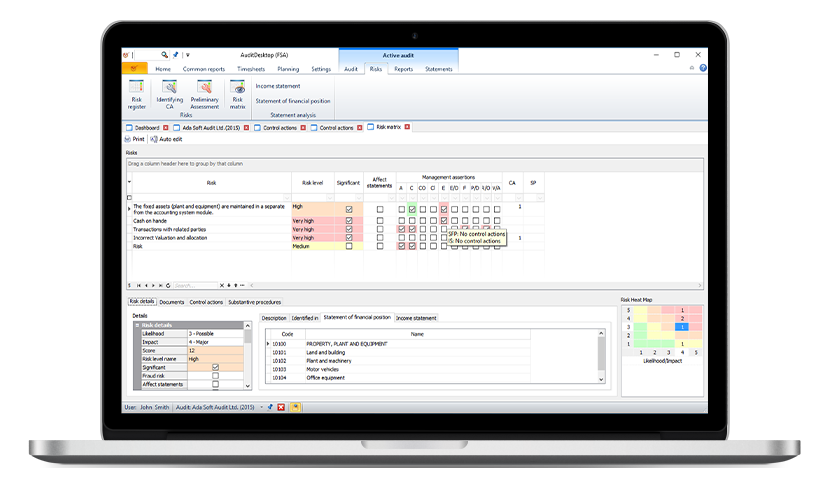
On a single screen, AuditDesktop matches all identified and assessed risks with all identified and assessed control activities. This enables the auditor to see all uncovered risks, the affected management assertions, and also to see the impact on the items from the financial statements. All this in one place. We call it “the whole picture” as it enables the auditor to see the whole information and to plan appropriate substantive and control tests in response to identified risks.
All checkboxes coloured in red indicate issues that need to be addressed. When the auditor points the cursor of the mouse over a red colored check box, AuditDesktop displays a detailed description of the problems that are identified. For instance – no control tests were found that addresses the existence and the completion regarding an identified risk, which has an impact on the “property plan and equipment” item from the statement of financial position.
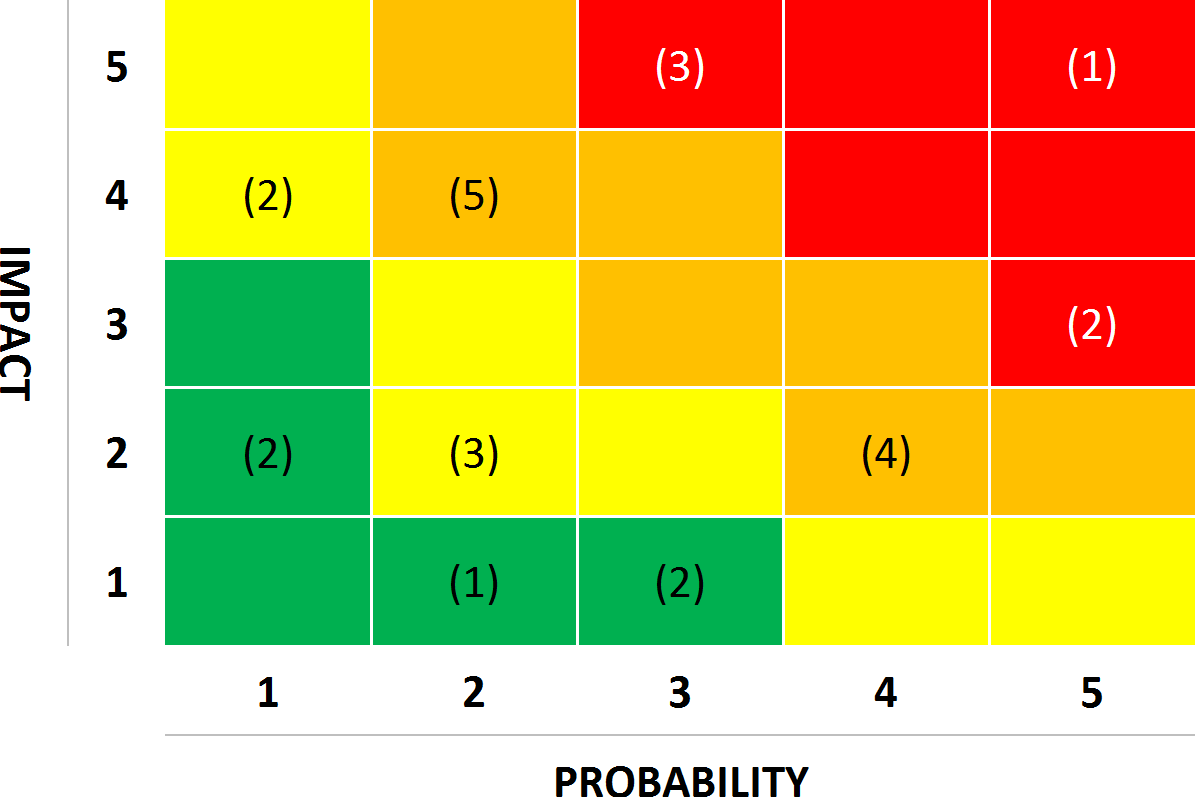
Risk heat map
The risk heat map shows the number of risks in relation to the likelihood and impact score that are generated during the assessment process.
25 years
of experience – since 1993
98.5%
client satisfaction rate
0-day
cases resolved on the same day
24/6
dedicated support
5.5K+
happy clients